Living
How to set up a home office that is comfortable and productive
How to set up a home office: choosing the space, desk and chair height, screen position, lighting, noise and habits that keep work and home separate.
 Bitezine Editorial TeamRankings, reviews & guides 6 min read
 AI generated
Knowing how to set up a home office properly pays off every working day. A kitchen table and a laptop may be fine for an afternoon, but weeks of hunching over a small screen tend to show up as a stiff neck, sore wrists and tired eyes.
A good setup does not require a spare room or a big budget. It needs the right spot, a few ergonomic adjustments, decent light and some boundaries between work and home. This guide covers each of them in order.
Choose the right spot for your home office
Ideally, work in a room with a door you can close. It reduces noise and makes it easier to switch off at the end of the day. If that is not possible, a quiet corner of the living room or a wide hallway can work, as long as the area is used only for work during working hours.
Look for natural light, a nearby power socket and a good internet signal. Avoid placing the desk directly facing a bright window, which causes glare and eye strain, or with the window directly behind you, which puts your face in shadow on video calls. A position where daylight comes from the side is usually best.
Desk height and chair setup
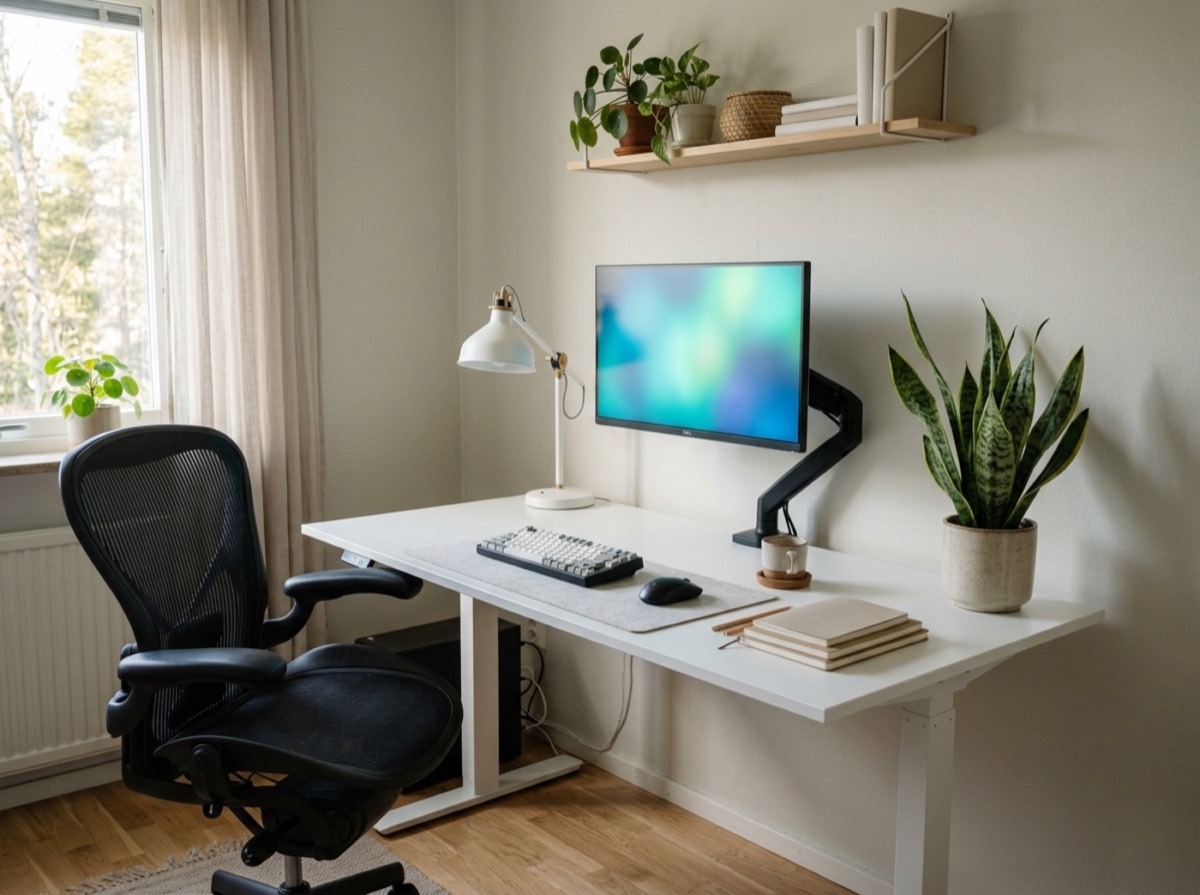
Start with the chair, then adjust everything else around your body. Sit with your back against the backrest, feet flat on the floor or on a footrest, and thighs roughly parallel to the floor. Your knees should sit at about the same height as your hips or slightly lower.
The desk surface, or at least the keyboard, should be at a height where your elbows are bent at roughly a right angle and your shoulders stay relaxed. If the desk is too high and cannot be adjusted, raise the chair and use a footrest. A chair with adjustable height, lumbar support and armrests that do not push your shoulders up makes a real difference over long days.
A height-adjustable desk lets you alternate between sitting and standing. Standing all day is not the goal; changing position regularly is.
Standing all day is not the goal; changing position regularly is.
Monitor height and distance
Common ergonomic guidance is to place the screen about an arm's length away, directly in front of you, with the top of the screen at or slightly below eye level. You should be able to read it without leaning forward or tilting your head back. People who wear varifocal glasses often need the screen a little lower.
Laptops are the main problem, because the screen and keyboard are joined. If you work on a laptop for long periods, raise it on a stand or a stack of books and use a separate keyboard and mouse. An external monitor is one of the most useful upgrades for a home office.
Keep your eyes comfortable by following the 20-20-20 rule: every 20 minutes, look at something about 20 feet, or six metres, away for 20 seconds.
Keyboard and mouse position
Place the keyboard directly in front of you, close enough that your upper arms hang naturally by your sides. Your wrists should stay straight while typing rather than bent upward or sideways. Keep the mouse right next to the keyboard at the same height, so you are not reaching for it.
Vary how you work. Keyboard shortcuts reduce mouse use, and alternating hands or using a different pointing device can ease strain if you notice discomfort.
Home office lighting
Good lighting reduces eye strain and makes you look better on camera. Use daylight where possible and add a ceiling light or floor lamp for general brightness, plus a desk lamp for paperwork. Position lamps so they do not reflect on the screen.
For video calls, place a soft light source in front of you, slightly above eye level, rather than behind you. Adjust screen brightness to match the room; a screen much brighter than its surroundings is tiring to look at.
Noise, temperature and air
Rugs, curtains, bookshelves and soft furniture absorb sound and reduce echo on calls. Headphones with a microphone help in busy households. Agree on quiet times with others at home for important meetings.
A comfortable temperature supports concentration, and a stuffy room makes you sleepy. Open a window briefly every hour or two to let in fresh air. Plants add a pleasant touch, though their effect on air quality in a normal room is small.
Home office setup checklist
Use this list to check your space once everything is in place.
- Stable desk with enough depth for the screen at arm's length
- Adjustable chair with lumbar support
- Footrest if your feet do not reach the floor
- External monitor or laptop stand
- Separate keyboard and mouse
- Desk lamp and good general lighting
- Headset for calls
- Reliable internet, with a wired connection or router close by if possible
- Cable management and a surge-protected power strip
- Storage for papers so the desk stays clear
Keep work and home separate
Without a commute, work easily spills into the evening. Set fixed start and end times and create small rituals that mark them, such as a short walk before you start and closing the laptop and tidying the desk when you finish.
Take proper breaks away from the desk and move regularly. If your office is in the bedroom, put work items out of sight at the end of the day, for example in a box or behind a curtain, so the room can feel restful again.
Frequently asked questions
How do I set up a home office in a small space?
+
Choose a compact desk or a wall-mounted fold-down table, use vertical shelving and keep only daily essentials on the surface. A laptop stand with a separate keyboard saves space while still giving good posture. Define the area with a rug or lamp so it feels like a workspace.
What is the correct monitor height?
+
The top of the screen should be at or slightly below eye level, with the screen roughly an arm's length away. You should be able to read it without tilting your head up or leaning in. Varifocal wearers often need it a little lower.
How high should my desk be?
+
High enough that your elbows are bent at about a right angle with relaxed shoulders when you type. The right height depends on your body and chair, so adjust the chair first and use a footrest if the desk is fixed and too high.
Is it bad to work from the bed or sofa?
+
Occasionally it is fine, but regularly working from a bed or sofa usually leads to poor posture and neck or back strain. It can also make it harder to relax in those spaces. A proper desk and chair are better for daily work.
Where should I put my desk in relation to a window?
+
Place the desk so daylight comes from the side. Facing a bright window causes glare, and sitting with the window behind you creates reflections on the screen and shadows your face on video calls.
What equipment do I need for a home office?
+
The basics are a stable desk, an adjustable chair, a screen at the right height, a separate keyboard and mouse, good lighting, a headset and reliable internet. Storage and cable management help keep the space tidy.
Once you know how to set up a home office, the changes are mostly small: raise the screen, adjust the chair, fix the light and set clear boundaries. Check your setup again after a few weeks and pay attention to any aches. A comfortable workspace protects your health and makes the working day at home far more pleasant.
How we research: Guides are written from established sources and checked for accuracy. They are general information, not professional advice.
Written by
Bitezine Editorial Team
Rankings, reviews & guides
Our editors research every piece from makers’ documentation, independent tests and owner reports, and update it when products change.