Tech
OLED vs LCD explained: which screen is better for you?
How OLED and LCD screens work, how they differ in contrast, brightness, burn-in, eye comfort and price, and which one suits TVs, phones, laptops and monitors.
 Bitezine Editorial TeamRankings, reviews & guides 5 min read
 AI generated
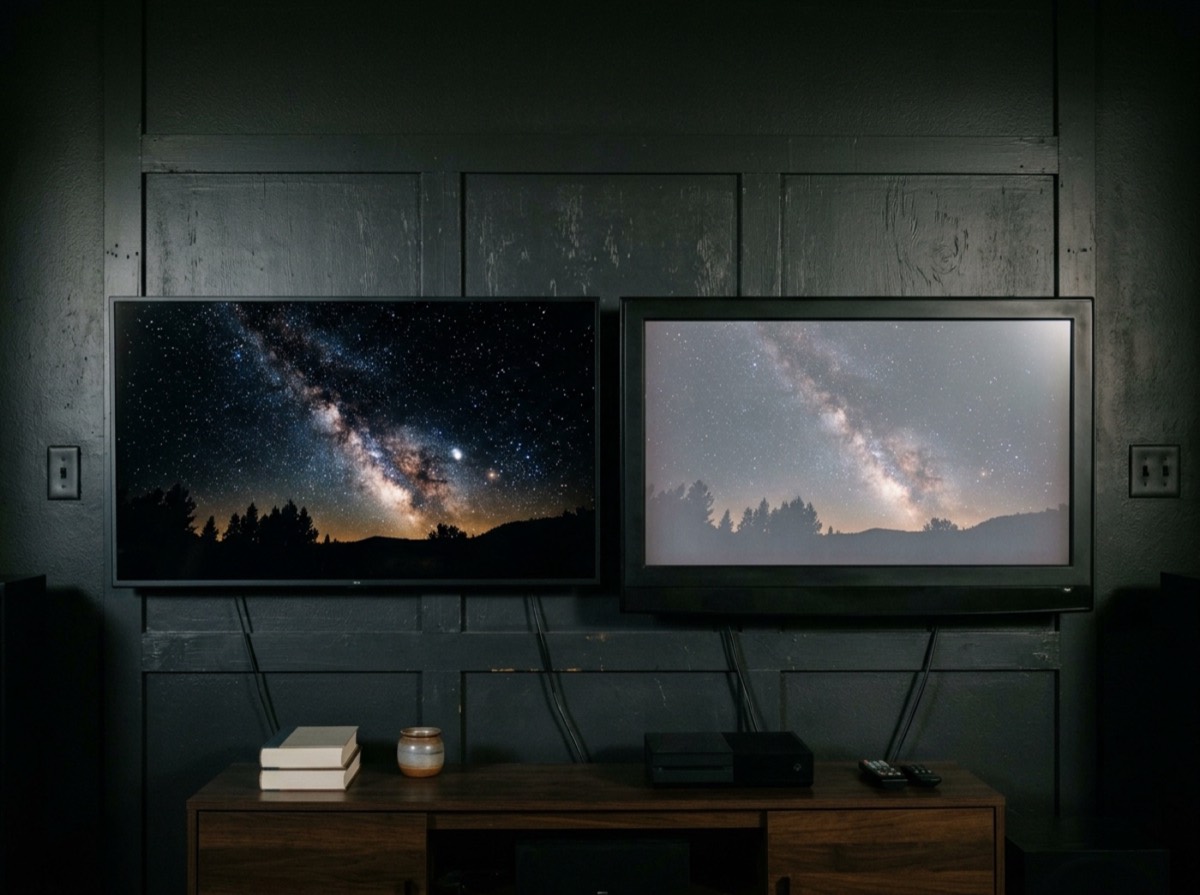
OLED vs LCD is the main choice behind almost every screen you buy, from phones and laptops to monitors and TVs. The two technologies create an image in fundamentally different ways, and that difference shapes contrast, brightness, power use, lifespan and price.
This explainer covers how each works, where each one wins, and how marketing terms such as QLED, Mini-LED and AMOLED fit into the picture, so you can pick the right screen for the way you actually use it.
How an LCD screen works
An LCD, or liquid crystal display, cannot make its own light. Behind the panel sits a backlight, today almost always made of LEDs. Layers of liquid crystals and polarising filters in front of it act like tiny shutters that open or close to let light through, and colour filters turn that light into red, green and blue subpixels.
Because the backlight is always on while the screen is on, some light leaks through even when a pixel should be black. That is why LCD blacks tend to look dark grey in a dim room. Panel types such as IPS and VA handle this differently: IPS offers wide viewing angles, while VA usually delivers deeper blacks but narrower viewing angles.
How an OLED screen works
OLED stands for organic light-emitting diode. Each pixel is made of organic compounds that glow when electricity passes through them, so every pixel produces its own light and no backlight is needed.
A pixel that is switched off emits no light at all, which gives OLED true black and extremely high contrast. OLED panels can also be very thin and flexible, which is why they are used in foldable phones and curved screens. AMOLED, common on phones, is simply an OLED panel driven by an active matrix of thin-film transistors.
An OLED pixel that is off gives true black; an LCD can only try to block a light that is always on.
OLED vs LCD: the key differences
Neither technology wins every category. The comparison below reflects typical screens of each type; individual models can differ.
- Contrast and black levels: OLED is clearly better, with perfect blacks and no blooming
- Peak brightness: LCD, especially Mini-LED, generally gets brighter across large areas
- Viewing angles: OLED holds colour and contrast better from the side
- Response time: OLED pixels switch almost instantly, which reduces motion blur
- Burn-in: LCD is essentially immune, OLED carries some risk with static content
- Power use: OLED is efficient with dark content, LCD is more consistent with bright content
- Price: LCD is cheaper at every screen size
What is OLED burn-in and should you worry?
Burn-in is permanent image retention. Because each OLED pixel ages as it emits light, elements that stay on screen for many hours, such as news tickers, game HUDs, taskbars or channel logos, can wear some pixels faster than others and leave a faint ghost image. Blue organic material tends to degrade faster than red and green.
Modern OLED screens reduce the risk with pixel shifting, automatic brightness limiting on static elements and compensation cycles that run while the device is in standby. For mixed use, such as films, series and varied games, burn-in is unlikely to be a problem. If your screen shows the same static layout for hours every day, for example as a work monitor or with constant news channels, an LCD is the safer choice.
Where QLED and Mini-LED fit in
QLED is a type of LCD. It adds a layer of quantum dots that makes colours purer and more vivid, but it still relies on a backlight. Mini-LED is also an LCD, using thousands of very small LEDs grouped into many dimming zones. Zones behind dark parts of the image can dim or switch off, which greatly improves contrast.
Mini-LED narrows the gap to OLED and can be much brighter, though a bright object on a dark background can still produce a faint halo, called blooming. QD-OLED is a separate hybrid that combines OLED pixels with quantum dots for brighter, more saturated colour.
Which is better for your eyes?
Both technologies are safe for normal use. The differences come from how brightness is dimmed. Many OLED screens reduce brightness using pulse-width modulation, which switches pixels on and off rapidly. Most people never notice, but a minority of sensitive users report eye strain or headaches, particularly at low brightness settings.
Many LCDs dim their backlight with little or no flicker, although some budget models also use slow PWM, and some sensitive users find flicker-free screens more comfortable. If you are prone to eye strain, look for reviews that measure flicker, and try the screen in person at low brightness. Regular breaks and sensible room lighting matter more than panel type for most people.
OLED or LCD: which should you buy?
Match the technology to your room and habits rather than to a spec sheet.
- TV for films in a dim room: OLED for its contrast and black levels
- TV for a very bright living room: Mini-LED or a bright LCD
- Gaming: OLED for response time, but vary content to limit burn-in
- Office or productivity monitor with static windows: LCD, usually IPS
- Phone: OLED is now standard on most mid-range and premium models and helps battery life with dark mode
- Tight budget: LCD gives the most screen for the money
Frequently asked questions
Is OLED better than LCD?
+
OLED is better for contrast, black levels, viewing angles and motion. LCD is usually brighter, cheaper and free from burn-in risk. The better choice depends on your room lighting, content and budget.
How long do OLED screens last?
+
Modern OLED TVs and phones are designed to last many years of normal use. Brightness slowly declines over time, and heavy static content increases burn-in risk, but typical mixed viewing rarely causes problems within a device's normal lifespan.
Is QLED the same as OLED?
+
No. QLED is an LCD with a quantum dot layer and a backlight. OLED pixels emit their own light. The names sound similar but the technologies are different.
Does OLED save battery on phones?
+
Yes, especially with dark mode and dark wallpapers, because black pixels are switched off and use no power. With mostly white content, the saving is much smaller.
Is OLED or LCD better for gaming?
+
OLED offers near-instant response times and superb contrast, which many gamers prefer. If you play one game with a fixed HUD for many hours a day, a Mini-LED LCD avoids burn-in concerns.
Can OLED burn-in be fixed?
+
True burn-in is permanent. Temporary image retention often fades on its own or after the screen runs its pixel refresh cycle. Using built-in protection features helps prevent lasting damage.
OLED and LCD each have clear strengths. OLED delivers perfect blacks, rich contrast and fast motion, while LCD, and especially Mini-LED, offers higher brightness, lower prices and no burn-in worries. Think about where the screen will sit, what you will show on it and for how long, and the right choice becomes obvious.
How we research: Guides are written from established sources and checked for accuracy. They are general information, not professional advice.
Written by
Bitezine Editorial Team
Rankings, reviews & guides
Our editors research every piece from makers’ documentation, independent tests and owner reports, and update it when products change.